

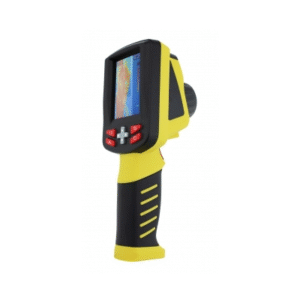
Enviro Test Construct Infrared Thermometer with Image Manager (Wide Measurement) is a real time thermal imager used by fire fighters and with the wide Temperature measurement range from -4 °F ~ +1112 °F (-20 ℃ ~ +600 ℃).This thermal imager’s use advanced uncooled focal plane array infrared detector and is featured with unique firefighting color scale and temperature measurement function. This handheld device is specifically designed to aid firefighters protecting and searching under fog or dark environment. It complies with IP67 standards.
Key Features
- One key operation
- Supports Power indicator function to indicates the power status of the battery
- Apply to fire rescue
- Unique fire-control color palette
- IP67 standards
- Large LCD size
Technical Specifications
| Detector Characteristics | |
| Detector Type | uncooled FPA micro bolometer |
| Array Size/Format | 160 x 120 pixel |
| Drop Test | 1.0 m |
| Standards | IP67 (water resistance: under 1 meter) |
| Image Characteristics | |
| Field of View | 30° x 22.5° (H x V) |
| Thermal Sensitivity | ≤32.18 °F @ 86 °F (≤0.1 ℃@30 ℃) |
| Focus | Fixed |
| Spatial Resolutions (IFOV) | 3.3 mrad |
| Frame Rate | 50 Hz/60 Hz |
| Spectral Range | 8 μm ~ 14 μm |
| Detect Distance | ≥ 164 ft. (50 m) |
| Startup Time | Thermal image output ≤ 25 seconds @ 86 °F (30 ℃) |
| Image Display | |
| LCD | 260,000 color, 3.5″ TFT LCD, 640 x 480 pixel |
| Measurement | |
| Temperature Range | -4 °F ~ +1112 °F (-20 ℃ ~ +600 ℃) |
| Accuracy | ±35.6 °F (±2 ℃) or ±2% |
| Measurement Correction | Fixed emissivity |
| Measurement Mode | Fixed spot |
| Color Palette | Palettes changeable (Include fire control, Grey and grey inverted) |
| Power Supply | |
| Battery Type | (NIMH) battery, rechargeable |
| Battery Recharge Time | ≤2 hours |
| Battery Working Time | More than 2 hours continuous operation |
| Battery Recharge Time | More than 500 times |
| Charger Type | Intelligent charger |
| Dimensions | 7.48 in x 5.03 in x 10.74 in (190 mm x 128 mm x 273 mm) |
| Weight | ≤ 2.86 lbs (≤ 1.3 kg) |
| Storage Temperature | -40 °F ~ +158 °F (-40 ℃ ~ +70 ℃) |
| Operating Temperature | +122 °F ~ +500 °F (50 ℃ ~ 260 ℃) |
Additional Information
Accessories

① Enviro Test Construct Thermal imager
② Power Adapter – 1
③ Ni-H Charging Battery – 2
④ Battery Charger -1
⑤ Carrying case
Appearance and Function


| Number | Description |
| ① | Power Button: Press and hold the button to turn on or turn off the device. Press the button to switch between the three palettes. |
| ② | Battery Buckle |
| ③ | Handle/Battery Compartment |
| ④ | Lens |
| ⑤ | LCD Display Screen |
| ⑥ | Battery Indicator: Indicates the remaining capacity of power. |
| ⑦ | Power Indicator: Indicates the current power on or power off state. |
Battery Introduction
When the battery is full, the Indicator displays as a full green icon. When the battery is half full, the Indicator displays as a half green icon. In the remaining use period, the Battery Indicator displays as a red icon. When the remaining operating period of time is less than 20 minutes, the Battery Indicator will blink to remind the operator to pay attention to the operation time. When the remaining operating period of time is less than two minutes, the screen will display a dialog of “Battery Exhausted”. The dialog will blink for 10 times and the device will be automatically turned off.
Load and Unload of the Battery


Battery Load Approaches
The loading approaches can be described as follows:
- Open the Battery compartment cover, and put the battery in the compartment, then push it in the compartment, until it is optimally charged, shown as Figure (a).
- Close the Battery Compartment Cover, shown in Figure (b).
- Close the Battery Buckle, and let it fasten the Battery, shown in Figure (c).
The unloading approaches are just the reverse of the above steps.
- Open the Battery Buckle, and free the Battery fastener, shown in Figure (c).
- Open the Battery Compartment Cover, shown in Figure (b).
- Taken out the battery from the compartment, then pull it along the compartment, shown as Figure (a).
- Close the Battery Compartment Cover and the Battery Buckle.
Operation Guide
Interface Description
Interface

| Number | Name | Description |
| ① | High Temperature Scale Symbol | It is automatically shown up when the system changes to the high temperature display method. High temperature displays as red color. |
| ② | Temperature Result | Shows the measured temperature of the central point |
| ③ | Scale | The chosen palette of the current scale. (Three palettes optional). |
| ④ | Spot Cursor | Displays the current measuring point |
| ⑤ | Battery Indicator | Displays the current power level of the Battery. |
Operation Flow




Reviews
There are no reviews yet.