
Overview
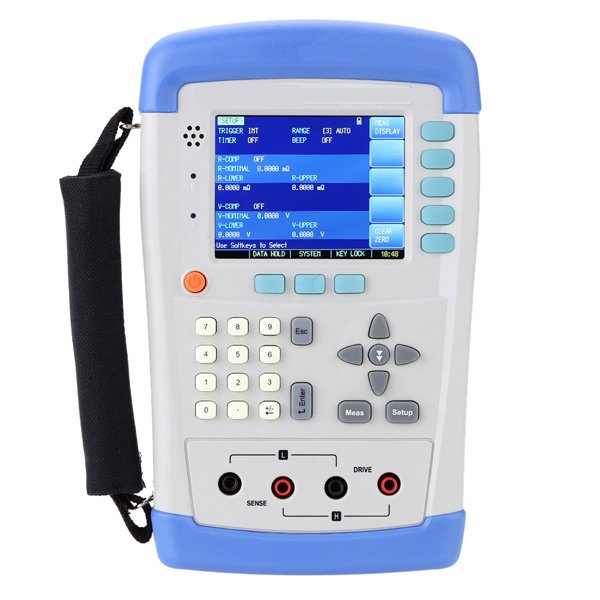
Enviro Test Construct Milliohm Ohmmeter with SCPI Command (Keypad Lock) uses high-performance processors and is equipped with 3.5″ TFT LCD smart screen handheld meter. It can guarantee 0.05 % accuracy even under the condition that the testing speed is under 15t/s. It is equipped with a mini-USB interface to apply remote control, data acquisitions and analysis with long time accuracy and convenient measurements of passive components to achieve with wide measurement range from 10 μΩ to 20 MΩ and maximum reading of 20000. It can guarantee 0.05 % accuracy even under the condition that the testing speed is under 15t/s. Its unique current testing mode can adapt different testing requirements like high-ohm, medium-ohm, low-ohm tester; switch connect, connector contact, relay coil and contact resistance; Transformer, Inductor, motor, deflection coil winding resistance, wire resistance. The metal winding resistance of vehicle, vessels, and airplane; PCD line and hole, etc.
Key Features
- Portable design with dual-color protective cast shell
- Automatic power off function
- Comparator function: GD/NG Show
- 3.5 inches, True color 16 M, TFT-LCD Display
- Auto Zero – Adjust for each range
- Four-terminal resistance measurement
- Mini-USB interface
- SCPI compatible command sets
- Keypad lock function
- Background- lightness adjustment function
- Battery and external power supply
- Automatic shut down
Technical Specifications
| Temperature | 73.4 °F ±41 °F (23 °C ±5 °C) |
| Humidity | ≤ 65 % RH |
| Correction | short-circuit clear zero |
| Warming Time | >60 min |
| Adjustment Time | 12 months |
| Working Environment | |
| Normal Temperature | 59 °F to 95 °F (15 °C to 35 °C) |
| Working Temperature | 50 °F to 104 °F (10 °C to 40 °C) |
| Storage Temperature | 32 °F to 122 °F (0 °C to 50 °C) |
| Nominal Humidity | < 80 % R.H. |
| Working Humidity | 10 % to 90 % R.H. |
| Storage Humidity | 10 % to 90 % R.H. |
| High Current Mode | |
| Speed | Fast-30 times/sec Med-15 times/sec Slow-3 times/sec |
| Dimensions | 5.12 in x 8.29 in x 1.49 in (130.23 mm x 210.76 mm x 37.88 mm)
|
| Weight | 1.10 lbs (500 g) |
| Working Time | ≥ 8 h @ 25 % Brightness |
| Temperature and humidity range: | 59 °F to 95 °F (15 °C to 35 °C), 80 % RH or less |
| Storage temperature and humidity range: | 50 °F to 104 °F (10 °C to 40 °C), 10 % to 90 % RH |
USB Host Port
- Mini-USB Slave Port
- Reserved Interfaces
- Power Adaptor
Power Supply
The instrument can be powered by Li battery. When the battery is low, only power adaptor can charge the battery.
Test Slots
Insert the cable box into test slots.
Charge the battery
Use the power adaptor to charge the battery. The Power key is orange when charging the battery even the instrument is turned off. When the battery is full the indicator is out.
Power key is orange when charging
Turn ON/OFF:
To turn ON/OFF the instrument press the power key
<MEAS DISPLAY>Page
- Press [MEAS] to enter <MEAS DISPLAY>Page.
- The [MEAS] page includes following setup:
- Trigger
- Range
- Mode– Current Mode
- Speed – Test Speed
- Comparator– Sorting Settings
- Beep – Beep Settings
[TRIGGER]:
It includes three settings:
- Internal Trigger
- Manual Trigger
- BUS Trigger
Trigger Setting:
| Trigger | |
| Internal | Internal trigger |
| Manual | Press the [Enter] key once, the instrument runs a test cycle |
| BUS | The instrument runs a test cycle by receiving RS232 trigger command. |
Procedure to set the trigger
| Step 1 | Press [Meas] key to enter <MEAS DISPLAY> page | |
| Step 2 | Use cursor keys to select [TRIGGER] field | |
| Step 3 | INT | Automatic Internal trigger |
| MAN | Manual trigger by pressing [Trig] key | |
| BUS | BUS trigger by RS-232 SCPI command | |
Resistance [RANGE]
It has three range modes:
- AUTO range
- Manual range
- Nominal range
Resistance Ranges:
| Range | Description | Pros | Cons |
| AUTO | Automatically. Impedance range is automatically set by selecting the best range | Convenient | Test speed is slower than manual ranging |
| HOLD | The instrument will always use the user-specified range | Highest speed | Set the range initially |
| NOMINAL | Automatically Select the best range according to nominal value | Best mode for sorting | Only available in sorting mode |
Resistance Measurement Range
| Range | Range Name | Measurement Range |
| 9 | 20MΩ | 2MΩ ~20MΩ |
| 8 | 2MΩ | 200kΩ ~2MΩ |
| 7 | 200kΩ | 20kΩ ~200kΩ |
| 6 | 20kΩ | 2kΩ ~20kΩ |
| 5 | 2kΩ | 200Ω ~ 2kΩ |
| 4 | 200Ω | 20Ω ~ 200Ω |
| 3 | 20Ω | 2Ω ~ 20Ω |
| 2 | 2Ω | 200mΩ ~ 2Ω |
| 1 | 200mΩ | 20mΩ ~ 200mΩ |
| 0 | 20mΩ | 0 ~ 20mΩ |
Procedure of setting the range
Procedure to set the trigger:
| Step 1 | Press [Meas] key to enter measurement page | |
| Step 2 | Use the cursor key to select [RANGE] | |
| Step 3 | AUTO | Auto range |
| HOLD | Current range is hold | |
| NOMINAL | Select the range according to resistance nominal value [ResNom] | |
| INCR+ | Increase range | |
| DECL- | Decline range | |
The DC voltage measurement range cannot be selected. Instrument always use automatic mode.
Comparator [COMP]
Set the comparator parameter in <SETUP> page and the page is about how to turn on/off the comparator.
| Step 1 | Press [Setup] key to enter measurement range | |
| Step 2 | Use the cursor key to select [COMP] field | |
| Step 3 | OFF | Comparator off |
| ON | Comparator on | |
[BEEP] Feature
Procedure to set the beep
| Step 1 | Press [Meas] key to enter measurement range | |
| Step 2 | Use the cursor key to select [SPEED] field | |
| Step 3 | OFF | Turn beep off |
| GD | Beep while pass | |
| NG | Beep while fail | |
Icons on <MEAS Display>
| Icon | Description |
| Powered by Li battery | |
| Powered by external power supply | |
| USB-Disk is available | |
| H | Hold current data |
< SETUP> page
Press [Setup] key to enter <SETUP>page.
<SETUP DISPLAY> page
Press [Setup] to enter <SETUP DISPLAY>page.
In <SETUP DISPLAY> page, the Instrument does not display test result and sorting result, testing is not in progress.
- BAUD – Select baud rate
- REL – Temperature Compensation
- TC-PAR – Input temperature coefficient
- TC-TEP – Input the reference temperature
Room Temperature Calibration
As the temperature probe was installed inside the instrument, it will cause deviation in measuring, especially in highest brightness. You need to calibrate the room temperature.
- Procedure to calibrate temperature:
| Step 1 | Press[Setup]to enter <SETUP DISPLAY>page |
| Step 2 | Select [TEMP CALIBRATE] |
| Step 3 | Select [OK] |
| Step 4 | Input the temperature value and press [Enter] to finish. |
Reset Room Temperature Calibration Factor
To reset the temperature calibration Factor that set at [TEMP CALIBRATE]
- Procedure to reset temperature:
| Step 1 | Press [Setup] to enter <SETUP DISPLAY>page |
| Step 2 | Press [TEMP RESET] |
| Step 3 | Press [OK] to finish temperature reset |
Front Panel Summary:
<MEAS DISPLAY> Page
Press [Meas] key to enter <MEAS DISPLAY>Page.
The <MEAS DISPLAY> page includes following setup:
Trigger Mode [TRIGGER]
Measurement Range [RANGE]
Test Speed [SPEED]
Comparator [COMP] ON/OFF
[BEEP] Feature
Soft-key VIEW DATA – To Enter [VIEWDATA] page
Soft-key SAVE DATA – To Store measurement result into internal flash disk
<MEAS DISPLAY>Page
[TRIGGER]
SCPI Command: TRIGGER: SOURCE {INT, MAN, BUS}
SCPI Query Command: TRIGGER: SOURCE?
It supports four trigger modes: INT (internal), EXT, MAN (manual) and BUS (RS -232)
Procedure to set the trigger:
Step 1 Press [Meas] key to enter <MEAS DISPLAY>Page
Step 2 Use cursor keys to select [TRIGGER] field
Step 3 INT Automatic Internal trigger
MAN Manual Trigger by pressing [Trig] key
BUS Trigger by RS232 SCPI command
[RANGE]
SCPI Command: FUNCTION: RANGE {<range number>, min, max}
SCPI Command: FUNCTION: RANGE: MODE {AUTO, HOLD, NOMINAL}
SCPI Query Command: FUNCTION: RANGE
SCPI Query Command: FUNCTION: RANGE: MODE
Measurement Speed [SPEED]
SCPI Command: FUNCTION: RATE {SLOW, MED, FAST}
SCPI Query Command: FUNCTION: RATE
SLOW, MED, FAST and ULTRA speed mode can be selected.
SLOW mode will result in more stable and accurate measurement result.
The following speed is measured in range-hold mode and comparator is ON:
SLOW: 1 times/sec (1s)
MED: 5 times/sec (100ms)
FAST: 0 times/sec (33ms)
[BEEP] Feature
SCPI Command: COMPARATOR: BEEP {OFF, GD, NG}
SCPI Query Command: COMPARATOR: BEEP
<VIEW DATA> page
The measurement result can be stored in internal nonvolatile memory by press the [SAVE DATA] soft-key in <MEAS DISPLAY> page.
Over 500 sets data can be saved.
The format of measurement result is:
[Resistance][Voltage][Date][Time]
You can review the saved data on the <VIEW DATA> page by pressing the
[VIEW DATA] soft-key in <MEAS DISPLAY> page.
<SYSTEM CONFIG> page
Press [SYSTEM] bottom soft-key to enter <SYSTEM CONFIG> page.
- LANGUAGE – Choose English
- DATE/TIME
- ACCOUNT
- BEEP Feature
- BAUD – RS-232/RS-485 Communication Baud Rate
- RS-485 Address
- SHAKE HAND – RS-232/RS-485 Shake Hand
- RESULT SEND – Acquire the test result by FETCH? Command or auto send
All settings in <SYSTEM CONFIG> will be saved into internal flash disk automatically
<VIEW DATA> page
The measurement result can be stored and internal nonvolatile memory by press the [SAVE DATA] soft-key in <MEAS DISPLAY> page. Over 500 sets data can be saved. The format of measurement result is:
[Resistance][Voltage][Date][Time]
You can review the saved data on the <VIEW DATA> page by pressing the [VIEW DATA] soft-key in <MEAS DISPLAY> page
- SAVE TO DISK – Store all data into USB Disk
- RESET – The data will be stored from the start of the table.
- FORMAT – To format the internal nonvolatile memory disk, all data will be lost
- PAGE – Jump to the provided page
< SETUP> page
- Press [Setup] key to enter <SETUP>page.
- In <SETUP> page, the Instrument does not display measurement result and
- Comparator result, testing is not in progress.
- The <SETUP> page includes following setup:
- Trigger Mode [TRIGGER]
- Measurement Range [RANGE]
- Measurement Speed [SPEED]
- BEEP Feature
- Soft-key CLEAR ZERO – Clear Zero Correction
- R-COMP – AC Resistance Sorting Methods
- V-COMP– DC Voltage Sorting Methods
- R-NOMINAL – Input Resistance Nominal Value
- R-LOWER – Input Resistance Lower Limit
- R-UPPER – Input Resistance Upper Limit
- V-NOMINAL – Input Voltage Nominal Value
- V-LOWER – Input Voltage Lower Limit
- V-UPPER – Input Voltage Upper Limit
- Some settings can be also set up in <MEAS DISPLAY> page
| Applications | |||||||||||||||||||||||||||
| |||||||||||||||||||||||||||


Reviews
There are no reviews yet.